The Five-Minute Window: Handling Two-Step Verification
A Genshin Impact order stalls in one predictable spot: the account asks for a verification code while the purchase runs, and nobody is watching the inbox. Treat the code as a five-minute job — send it through the order chat and nowhere else — and the rest of the order stays inside its published 5–30 minute window.

Key takeaways
- Two-step verification codes belong in the order chat, which is the published advice and keeps the code with the order it belongs to.
- Stay logged out for the whole run: Genshin Impact allows one active session per account, and a second one interrupts processing.
- Published delivery is 5–30 minutes, around the clock, with longer queues in the first hours of a new banner.
- After delivery the store says it signs out and clears the login history on its side, so change the password once the crystals land.
What the five minutes actually refers to
Two-step verification is not a step on the shop's form; it is a prompt from the game account while somebody else is signed in and buying on your behalf. The published handling is short: if a code is needed, send it through the order chat. That single sentence carries three useful implications, and all three save time.
First, the code must reach a person who is waiting, so the inbox or authenticator has to be reachable for the whole window. Second, the code goes to one place only, which keeps it out of public threads and shared screenshots. Third, the order chat already knows your order number, so a support agent can match the code to the purchase immediately rather than starting a conversation about who you are.
Why the game has to stay closed
One active session per account is the published rule, and it is the reason the page asks buyers to stay logged out while the order is processed. Logging in to check progress pushes the processing session out, interrupts the purchase and leaves an order that is half-done. The crystals do not arrive faster because you watched.
Bookmark the order status instead. The Order Record keeps the status visible without touching the game, and a confirmation email follows once the order completes, so there is a way to track progress that does not risk the order itself.
The published window, measured across games
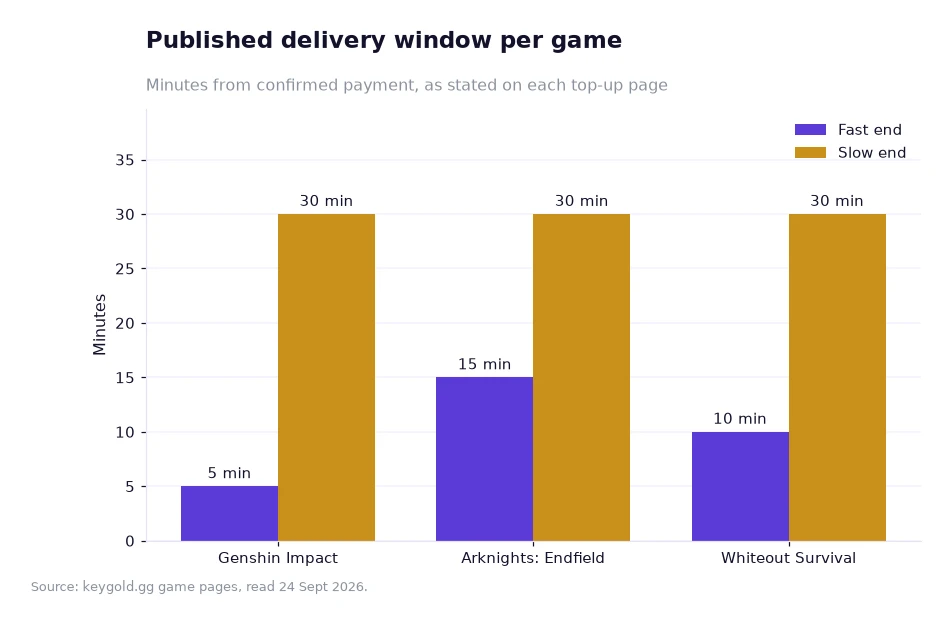
The chart on this page comes from the client's own game pages and shows the published delivery start and end for three titles: Genshin Impact from 5 to 30 minutes, Arknights: Endfield from 15 to 30 minutes, and Whiteout Survival from 10 to 30 minutes. Genshin Impact has the fastest floor and shares the same ceiling, which is why the account setup matters more here than on a slower ladder.
Read the chart as a planning tool rather than a schedule. The floor is what a clear order can take; the ceiling is the slow end, and it is reached when queues build — the Genshin page attributes longer waits specifically to the first hours of a new banner. If you order in that period, budget for the slow end and the order arrives as a pleasant surprise rather than a missed plan.
What each game asks for at the form
The table below repeats the published windows beside the details each order needs, because the two are linked: a form that is complete is what keeps an order near the fast end of its window.
| Game | Published window | What the order needs |
|---|---|---|
| Genshin Impact | 5–30 minutes, 24/7 | HoYoverse Account email, password, server |
| Arknights: Endfield | 15–30 minutes | Gryphline email, password, Player UID, nickname, server |
| Whiteout Survival | usually 10–30 minutes | Facebook or Google login, account, password |
| Wuthering Waves | faster with an email-linked Kuro account | Kuro Games email, password, character name |
A worked example: timing one order
My own example, on a single order, with each assumption written down. It is arithmetic on published windows, not a forecast.
- Assumption one: the published window runs from confirmed payment, 5 minutes at the fast end and 30 at the slow end.
- Assumption two: a verification code is requested and sent within 5 minutes, which is the job this article is about.
- Step one: an order confirmed at 20:00 cannot finish before 20:05, the fast end of the window.
- Step two: the slow end is 20:30, so the whole spread is 20:30 − 20:05 = 25 minutes.
- Step three: a mid-point estimate for planning is 20:05 + 12.5 minutes = about 20:18.
- Step four: on price, the 980+110 tier at $10.83 twice gives 1,090 × 2 = 2,180 crystals for $21.66.
- Step five: 2,180 ÷ 160 Primogems per Wish = 13.6 Wishes, so $21.66 ÷ 13.6 = about $1.59 per Wish.
Both halves of the example sit on assumptions you can change. A queue in the first hours of a banner pushes the finishing time towards 20:30 while leaving the price untouched; the 15% new-user coupon, valid 30 days with no threshold, moves the price while leaving the clock alone. The one variable that affects both is a missing code: five minutes of silence can shift an order from the fast end to a support conversation.
After the crystals land
Change the password. The store states that it signs out and clears the login history on its side once the order is done, and rotating credentials afterwards is the published advice rather than an optional extra. The page rates the game 5.0 from 796 evaluations and keeps live chat staffed 24/7, so a question about a missing tier or a pending order has somewhere to go at any hour.
If you are new to the store, the top-up catalogue shows the full price list, the help centre restates the code and session rules, and the store blog covers the same ground in shorter form.
Anyone starting with the cheap genshin top up route can treat the code step as part of the purchase rather than an interruption to it. The order is only as quick as its slowest step, and the slowest step is the one that happens outside the form, on a phone, while the buyer is deciding whether to log in and check.
Frequently asked questions
Where should a two-step verification code be sent?
Through the order chat and nowhere else. That is the published advice, and it keeps the code inside the thread that already holds your order number. Keep the inbox or authenticator reachable for the whole processing window, and stay out of the game so the processing session is not pushed out.
What should I do once the order is delivered?
Change the password, because the store states that it signs out and clears the login history on its side after delivery. The order stays visible in the Order Record, a confirmation email follows when it completes, and live chat remains staffed 24/7 if anything looks wrong afterwards.
Handling the code without losing the order
Have the inbox open before you submit, answer any prompt inside the order chat, and close the game for the duration. Following those three habits keeps an order near the fast end of the published 5–30 minute window and removes the only step in the process that depends on you being awake. Everything else — the tier ladder, the coupon and the refund terms — is already described on the store's own pages, so there is nothing extra to research before paying.
Delivery windows, account requirements, prices, the coupon terms and the rating quoted above come from KeyGold's own pages, read 24 Sept 2026. [1]